
Configuration
Karma ships with a simple textbased property configuration.
This document describes:
- the options and the coresponding functionality whos controlled in property files
- which values the options could have
- what are the defaults
configuration files
Normally you will find the configuration files in the ~/config directory on the server. These files maybe YAML, JSON or JavaScript.
Following you will find the loading order of these files (a later file extends/overwrites a previous file):
 - `<hostName>.yaml`: foo.yaml
 - `<hostName>-<NODE_APP_INSTANCE>.yaml`: foo-beta.yaml
 - `<NODE_ENV>.yaml`: development.yaml or production.yaml
 - `<NODE_ENV>-<NODE_APP_INSTANCE>.yaml`: development-beta.yaml
 - `<hostName>-<NODE_ENV>-<NODE_APP_INSTANCE>`: foo-production-beta.yaml
 - local.yaml
 - `local-<NODE_APP_INSTANCE>.yaml`: local-beta.yaml
 - `local-<NODE_ENV>.yaml`: local-production.yaml
 - `local-<NODE_ENV>-<NODE_APP_INSTANCE>.yaml`: local-production-foo.yaml
main parts
log:
options to adjust the loglevel of the programm parts. For normal purpose we use the loglevel 'warn' and 'debug' for troubleshooting. You can control the amount of messages based on componentents.
log:
  level: info
  components:
    # bootstrap: trace
    # initialize: trace
    # finalize: trace
    # initialize: trace
    # http: trace
    # ldap: trace
    # rbpm: trace
loglevel could be: trace, debug, info, warn, error
Network Parts
http:
This configuration is used for the frontened part of the application.
http.server:
In that pattern you can change the IP-Adress and the Port. We recommend the using of a http webserver (Apache or NGinx) as a proxy server for the application becouse of better performance.
Example:
http:
  server:
    port: 9999
    host: 127.0.0.1
http.assets:
In the asset directory you can store the custimized images, logos or templates. The configuration is relative relative to CONFIG_DIR.
http:
  assets: ./assets
http.auth:
The http auth part also controlling the authentification and autorization for the application.
The parameter realm, tokenExpirationTimeand tokenSecret are used for the internal (Karma) token handling. Please be aware if you configure a loadbalanced system, use the same tokenSecret for all cluster members.
http:
  auth:
    realm: Karma
    tokenExpirationTime: 10h
    # openssl rand -base64 48
    tokenSecret: jEW+o75aFvJ6ZrpfocQVVtqiTx12f5SHMHNpSCrGCm1izYinYAXLuuehvRMPH1AG
Karma supports mainly three different types of authorization options.
- without any parameter -> local LDAP auth with an karma-own form.
- use Micro Focus OSP (One SSO Provider, packaged in Micro Focus IDM) as identity provider with the parameter
http.auth.osp.*andhttp.auth.sso.*-> How to configure - using header informations from an front proxy configuration (a.e. NAM) ->
http.auth.requestHeaderparameter
http:
  auth:
    osp:
      baseUrl: https://karma-ui.kenoxa.com
      clientId: k5-local
      clientSecret: clientSecret
    sso:
      logoutUrl: https://userapp.kenoxa.com/osp/a/idm/auth/app/logout
      landingUrl: https://userapp.kenoxa.com/landing/

      # SSO injection using HTTP Header
      requestHeader:
        # the header name
        name: REMOTE_USER
        # LDAP filter to query matching user
        # '%s' is replaced with value of header
        # used together with users.filter to create resulting filter
        # -> (&<%= users.filter %>(<%= users.id %>=%s))
        # filter: (&(<%= users.id %>=%s)(groupMembership=cn=karma,ou=groups,o=data))
        filter: '(<%= users.id %>=%s)'
        base: '<%= users.base %>'
        scope: '<%= users.scope %>'
The toobusy parameter controls if and when Karma refused to server any more requests. Basically this says if Karma needs more than this time to accept a new request it rejects this request by sending a 503 status code.
http:
  toobusy: 248ms
ldap:
Here you can configure the binding options for the main LDAP Server. If you configure a secure connection (ldaps) don't forget to check the ca parameter to configure the root-ca.
Optional you can encrypt some config values (ldap.bindDN, ldap.bindCredentials, rbpm.credentials.username and rbpm.credentials.password). See encryption section for more informations.
ldap:
  url: ldaps://ldap.kenoxa.com
  # use tlsOptions only for test purposes
  # tlsOptions: {rejectUnauthorized: false}
  bindDN: ENC(pcQUIcvRKTrdjClyDcogsTR6U_29DHFlsBDObe234567654323Z0UY9upEk5w)
  bindCredentials: ENC(6copvOvkK5UAAymvzkbReUJkO23456765432ZfuOe)
ldap.capabilities.proxyAuthorization
since v2.8.24
Use Proxied Authorization Control (RFC 4370) for ACL evaluation when available (since eDirectoy 9.0); this can be disabled and reverted to the old behavior (simple check on the ACL attribute for each entry) using:
ldap:
  capabilities:
    proxiedAuthorization: false
For this feature to work, the Karma LDAP Proxy account must have supervisor rights on the impersonated user. See here for more details and configuration.
additional ldap config
ldap:
  singleValueAttributes:
      - internetEMailAddress preferredLanguage salutation surname
  search:
    noCount: true
  capabilities:
    # preventEdirectorySimpleQueryBug: true
    # proxiedAuthorization: false
    search:
      ## eDir 8.x (small dataset)
      ## eDir 9.x (small/medium dataset)
      # paging: 'virtualListView'
      # serverSideSorting: true
      ## eDir 9.x (large dataset)
      paging: 'pagedResults'
      serverSideSorting: false
      ## eDir 8.8 (medium/large dataset)
      # paging: false
      # serverSideSorting: false
      # estimatedSize: false
rbpm
rbpm:
  url: https://userapp.kenoxa.com/IDMProv
  href: https://userapp.kenoxa.com/IDMProv
  allowedRestActions:
    - requestRolesAssignment
  driverRoot: 'cn=UserApplication,cn=driverset1,o=system'
  credentials:
    username: uaadmin
    password: novell
  defaultProvisioningRequestsCategory: dashboard
  provisioningRequestCategories:
    - accounts
    - attestation
    - nrf
    - service
    - entitlements
Enabling bulk approval for tasks
The bulk approval feature allows you to approve or deny multiple tasks in a single step. The standard role approval is bulk approvable by default. For custom workflows, you need to enable the feature by adding a hidden boolean form field bulkApprovable to your approval form configuration ...

... and set it to true in the Pre Data Item mapping
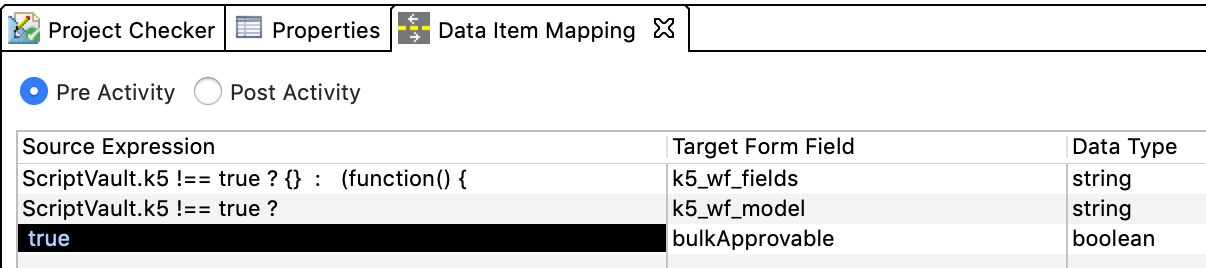
UI Object configuration
users:
users:
  base: <%= partitions.identity.users.base %>
  filter: '(structuralObjectClass=inetOrgPerson)'
  login:
    filter: '(objectClass=Person)'
  primaryPartitionAttribute: pager
  childObjectDNsAttribute: directReports
users.searchAttributes:
since v2.8.6
Search attributes can now be defined in the configuration file. If omitted defaults apply.
- The
$idis the ldap attribute to be searched. - The
labelmay be a plain text value or an translation key (see below:Custom i18n).
users:
  searchAttributes:
    - {$id: '$id', label: 'k5SiteSearch.attributes.id'}
    - {$id: '$name', label: 'k5SiteSearch.attributes.login'}
    - {$id: '$description', label: 'k5SiteSearch.attributes.description'}
    - {$id: 'givenName', label: 'k5SiteSearch.attributes.givenName'}
    - {$id: 'sn', label: 'k5SiteSearch.attributes.surName'}
    - {$id: 'mail', label: 'k5SiteSearch.attributes.mail'}
    - {$id: 'some-custom-field', label: 'Some Custom Field'}
Defaults:
users:
  searchAttributes:
    - {$id: '$id', label: 'k5SiteSearch.attributes.id'}
    - {$id: '$name', label: 'k5SiteSearch.attributes.login'}
    - {$id: '$description', label: 'k5SiteSearch.attributes.description'}
    - {$id: 'givenName', label: 'k5SiteSearch.attributes.givenName'}
    - {$id: 'sn', label: 'k5SiteSearch.attributes.surName'}
    - {$id: 'mail', label: 'k5SiteSearch.attributes.mail'}

accounts:
  searchAttributes:
    - {$id: '$id', label: 'k5SiteSearch.attributes.id'}
    - {$id: '$name', label: 'k5SiteSearch.attributes.login'}
    - {$id: '$description', label: 'k5SiteSearch.attributes.description'}
    - {$id: 'givenName', label: 'k5SiteSearch.attributes.givenName'}
    - {$id: 'sn', label: 'k5SiteSearch.attributes.surName'}
    - {$id: 'mail', label: 'k5SiteSearch.attributes.mail'}

roles:
  searchAttributes:
    - {$id: '$id', label: 'k5SiteSearch.attributes.id'}
    - {$id: 'nrfLocalizedNames', label: 'k5SiteSearch.attributes.name'}
    - {$id: 'nrfLocalizedDescrs', label: 'k5SiteSearch.attributes.description'}
users.cardattributes
since v2.8.14
user & account card attributes are configurable
The attributes shown in the cards of search results for user and account are configurable.
users:
  # the defaults are mail, telephoneNumber, roomNumber and container
  cardAttributes: mail telephoneNumber roomNumber
users.childObjectDNsAttribute
since 2.8.20
The relation between a user and its accounts can be configured and shown in the UI. Once configured a new panel is added to the user screen showing tha associated accounts and there roles.
(coresponding property: accounts.parentObjectDNsAttribute)
To enable this feature adjust your configuration:
users:
  # defines which multi-value attribute at the user contains the account DNs
  childObjectDNsAttribute: directReports
users.hideResourcesPanel
since 2.9.1
The resources panels can be disabled - it is not only hidden but the attributes are not requested from the ldap server
users:
  hideResourcesPanel: true
users.rolesFilterDefaultHidden
since 2.11.0
On the roles panel the roles can additionally be filtered by assignment type, level and category.
users: # works identically for accounts
  # defines which options are not selected by default
  # if not set all options are enabled by default
  rolesFilterDefaultHidden:
    # each value can be an array, comma or space separated string
    assigments: container # possible values: 'assigned', 'group', 'container'
    levels: # possible values: 10, 20, 30
    categories: system # any category defined in the UA
users.historyAttributes
since 2.11.0
The history tab and its content is configurable for users and accounts
users:
  # mapping from kind to ldap attribute
  historyAttributes:
    # the default configuration
    userID: 'k5UserIDHistory'
    role: 'k5RoleHistory'
    saphr: 'k5SaphrHistory'
    resource: 'nrfResourceHistory'
    lifecycle: 'k5UserLifecycle'

accounts:
  historyAttributes:
    # only hide resources, all others use the default config shown above
    resource: false

  # it is possible to hide the tab completly
  historyAttributes: false
users.businessCategories
since 2.11.0
The organizational units below users and accounts can now be used to narrow down a search.
Organizational units are grouped into primary and secondary. For each of these
you can define which businessCategory (an ldap attribute on organizational unit)
belongs to primary or secondary.
Note:
- Each
primaryOU should be hierarchically before anysecondaryOU. - To use this feature effectivly a value index on
businessCategoryshould exist.
Features
- filtered searches based on organizational units
- breadcrumbs have links to organizational unit search
- the ldap base for accounts maybe configured for each partition
users:
  businessCategories:
    primary: department
    # value can be an array, comma or space separated string
    secondary: section costCenter

accounts:
  businessCategories:
    # just use same as users
    primary: <%= users.businessCategories.primary %>
    secondary: <%= users.businessCategories.secondary %>
Styling
Each businessCategory should have a own icon to distinguish them.
In the custom css file define each businessCategory using a font-awesome icon.
/* using https://fontawesome.com/v4.7.0/icon/building for businessCategory: section */
.fa-section:before { content: "\f1ad"; }
users.actions
To start a workflow on the viewed user object in karm, you can use actions. The worklfow consumes the selected user by fromstate.recipient. To use this feature, you have to use Karma forms - otherwise Karma can't render the approval form.
users:
  actions:
    -
      # icon: ...
      # style: default
      workflow: cn=does-not-exist,cn=RequestDefs,cn=AppConfig,cn=UserApplication,cn=Driver Set,o=system
      # can be a karma role (user, admin, guest) or the DN of a user, group, role or conatiner
      # The role or DN specified here will be allowed to trigger the action by default
      # However, you can override the setting by changing the rule 'can trigger action' beneath `request` in your `rules.js`
      authz: user
      formState:
        recipient: <%= users.formState.initiator %>
additional config
users:
  patchAttributes:
    - telephoneNumber facsimileTelephoneNumber roomNumber street l postalCode
  roles:
    admin: '(groupMembership=cn=idm-admin,ou=groups,o=data)'
    user : true
    guest: true
obsolete config
since 2.10.0
The configuration options: detailAttributes and sapAttributes are now obsolete. Please use the new panel configuration instead.
detailAttributes:
    # configuration of showing attributes in detail panel
    manager[]:
      label: Child Objects
      type: entry
    employeeNumber: Mitarbeiternummer
    employeeStatus: Mitarbeiterstatus
    employeeType: Mitarbeitertyp
    passwordRequired: Passwort benötigt
    passwordAllowChange: Passwortänderung möglich
    passwordUniqueRequired: Eindeutiges Passwort nötig
accounts:
accounts:
  base: ' '
  filter: "(&\
    (objectClass=nrfRole)\
  )"
  parentObjectDNsAttribute: manager
accounts.searchAttributes:
since v2.8.6
Search attributes can now be defined in the configuration file. If omitted defaults apply.
- The
$idis the ldap attribute to be searched. - The
labelmay be a plain text value or an translation key (see below:Custom i18n).
acounts:
    searchAttributes:
    - {$id: '$id', label: 'k5SiteSearch.attributes.id'}
    - {$id: '$name', label: 'k5SiteSearch.attributes.login'}
    - {$id: '$description', label: 'k5SiteSearch.attributes.description'}
    - {$id: 'givenName', label: 'k5SiteSearch.attributes.givenName'}
    - {$id: 'sn', label: 'k5SiteSearch.attributes.surName'}
    - {$id: 'mail', label: 'k5SiteSearch.attributes.mail'}
accounts.cardattributes
since v2.8.14
user & account card attributes are configurable
The attributes shown in the cards of search results for user and account are configurable.
acounts:
  # the defaults are mail, telephoneNumber, roomNumber and container
  cardAttributes: mail telephoneNumber roomNumber
accounts.parentObjectDNsAttribute
since 2.8.20
The relation between a user and its accounts can be configured and shown in the UI. Once configured a new panel is added to the user screen showing tha associated accounts and there roles. (coresponding property: users.ChildObjectDNsAttribute)
To enable this feature adjust your configuration:
acounts:
  # defines which attribute (single or multi-value) at the account contains the user DN
  parentObjectDNsAttribute: manager
accounts.hideResourcesPanel
since 2.9.1
The resources panels can be disabled - it is not only hidden but the attributes are not requested from the ldap server
acounts:
  hideResourcesPanel: true
accounts.actions:
-> See on users.action
account.rolesFilterDefaultHidden
-> See on users.rolesFilterDefaultHidden
account.historyAttributes
-> See on users.historyAttributes
account.businessCategories
-> See on users.businessCategories
groups:
groups:
  base: 'ou=groups,o=data'
  scope: one
organizational Units:
organizationalUnits:
  base: ' '
  scope: 'sub'
  filter: "(&\
    (structuralObjectClass=organizationalUnit)\
    (|\
      (ou:dn:=kenoxa)\
      (ou:dn:=NetIQ)\
    )\
    (ou:dn:=users)\
  )"
roles:
roles.searchAttributes:
since v2.8.6
Search attributes can now be defined in the configuration file. If omitted defaults apply.
- The
$idis the ldap attribute to be searched. - The
labelmay be a plain text value or an translation key (see below:Custom i18n).
roles:
   searchAttributes:
    - {$id: '$id', label: 'k5SiteSearch.attributes.id'}
    - {$id: 'nrfLocalizedNames', label: 'k5SiteSearch.attributes.name'}
    - {$id: 'nrfLocalizedDescrs', label: 'k5SiteSearch.attributes.description'}
roles:
  sort: 'nrfLocalizedNames'
basket integration:
orders:
  base: 'cn=k5Orders,ou=karma,ou=res,ou=services,o=data'
  nrfRequestTemplate:
    nrfStatus: '5'

orderItems:
  base: 'cn=GlobalInputRequests,cn=nrfConfig,ou=res,ou=services,o=data'
certificate store:
ca:
  # openssl s_client -showcerts -connect ldap.kenoxa.com:636 </dev/null
  - ldap-ca.pem
  - ldap.pem
main UI features:
The ui.features block switches whole pages of the web UI on or off.
| Key | Default | Page |
|---|---|---|
users | true | Users: the users list and every user detail page |
accounts | true | Accounts: the accounts list and every account detail page |
roles | true | Roles: the roles list and every role detail page |
shoppingCart | false | Shopping cart, with its icon in the header and the buttons that add entries to it |
orders | same as shoppingCart | Orders: the orders list and every order detail page |
self | true | The pages of the signed-in user: profile, summary, tasks, requests and history |
tasks | false | The tasks list and every task detail page |
orderItems | same as orders | Has no page of its own |
tools | false | Tools |
reports | false | Reports |
When a page is off, Karma hides its entries in the side navigation and refuses every address under it, detail pages included. Deep links and bookmarks to such a page stop working: opening one shows the message "You are not allowed to access this page." Where Karma shows a user, account, role or order on another page, for example in the shopping cart, order details, task details or history, it shows the name as plain text instead of a link to the page that is off.
One exception: with self off, the user menu in the header still shows the
Profile link and, where it applies, the Summary link. Both lead to the
message "You are not allowed to access this page."
A page is on only when its value is true, or the text "true" or "1".
Every other value turns it off, including the number 1. Use true and
false. Unless you set them, orders takes the value of shoppingCart, and
orderItems takes the value of orders.
ui:
  features:
    accounts: true
    shoppingCart: true
    tools: true
    reports: true

  assets:
    # path within config/assets to an image shown in the header
    logo: logo.png
    # path within config/assets for an additional stylesheet to load
    styles: styles/custom.css
search on the lists:
The ui.search block controls when the search on the lists sends a search to
the directory. The defaults keep the behaviour of earlier versions.
| Key | Default | Effect |
|---|---|---|
minLength | 0 | On the users and roles lists, Karma searches only when the search term has at least this many characters or a filter of the extended search is set. The * wildcard and the ^ and $ operators (see below) do not count, so sm* is as short as sm. Below that, the list stays empty and shows a hint that names the number of characters and the filter option. This also applies when the list opens, so opening the list no longer loads all entries. 0 turns the check off. Karma checks this in the browser only; the REST API still accepts shorter terms. |
debounce | 350 | How long Karma waits after the last keystroke before it searches, in milliseconds. Applies to the search fields of the users, roles, orders and tasks lists. |
mode | auto | auto searches while you type and when a filter changes. manual searches only when you press Enter in the search field or click the Search button next to it. minLength still applies: submitting a shorter term shows the hint instead of searching. Applies to the users and roles lists. With manual, the list still loads once when it opens unless minLength prevents that. |
match | contains | How the search term is matched. contains finds entries where the term appears anywhere in a search attribute: smith finds "John Smith" and "Goldsmith". prefix finds entries where a search attribute starts with the term: smith finds "Smith" and "Smithers", but no longer "John Smith" through the full name, nor "Goldsmith". With prefix, a * at the start of the term is ignored, so *smith searches the same as smith. A directory with an index on the search attribute can answer a prefix search from that index, so it costs the directory much less than a contains search. Applies to every search field that searches users, accounts, roles or orders, and to the q parameter of the REST API. Selection fields in forms are not affected. |
listing | infinity | The view the lists open in. infinity is the cards view, which loads more entries as you scroll. classic is the list view, which shows one page at a time with Previous and Next buttons. Applies to every list with the view switch next to the search field (users, accounts, roles, orders and tasks). Users can still switch views unless listingToggle is false; their choice lasts until they reload the page. |
listingToggle | true | false hides the buttons that switch between the views, so every list stays in the view that listing sets. |
Example: search only after three characters and after a pause of 800 ms:
ui:
  search:
    minLength: 3
    debounce: 800
The search field understands these operators:
| Term | Finds entries where a search attribute |
|---|---|
smith | contains smith (match: contains) or starts with smith (match: prefix) |
^smith | starts with smith, whatever match says |
smith$ | ends with smith (match: contains) or is exactly smith (match: prefix, or ^smith$) |
sm*th | contains sm followed later by th (match: contains) or starts with sm followed later by th (match: prefix); * stands for any characters |
Search attributes that hold one value per language (their name contains
Localized, such as the role name nrfLocalizedNames) are matched per
language: ^smith, and smith with match: prefix, find entries where the
value in any language starts with smith.
Example: match from the start of the value and search only after three characters:
ui:
  search:
    match: prefix
    minLength: 3
Example: search only on Enter or the Search button, with at least three characters:
ui:
  search:
    minLength: 3
    mode: manual
The list view sends one extra request per search to count the matching entries, so each new search costs the directory a second search. Moving to the next or previous page of the same search sends no count request. When the directory does not report a count, the list view pages while pages come back full and shows the number of entries once it reaches the last page. After the first such search it sends no more count requests until the user leaves the list.
Page sizes come from the ui.pagination block:
| Key | Default | Effect |
|---|---|---|
itemsPerPage | 10 | Entries per page in the list view and in the paged lists on detail pages. Type-ahead suggestions load five times this number (at least 15, at most 100). |
itemsPerPageCardsView | 36 | Entries the cards view loads at a time: when the list opens and each time you scroll to its end. |
itemsPerPageOptions | [10, 25, 50, 100] | The page sizes users can pick in the settings menu of the list view. A pick lasts until they reload the page. |
Example: open the lists in the list view with 25 entries per page, without the view switch:
ui:
  search:
    listing: classic
    listingToggle: false
  pagination:
    itemsPerPage: 25
runInContext:
runInContext:
  scripts:
    'cn=k5-check-user,cn=UserApplication,cn=driverset1,o=system': './forms/check//wf.js'
dal:
Further documentation about Forms and dal you can find here.